
When designing a robust data architecture within Microsoft Fabric, one of the most crucial decisions you’ll face is determining the right number of workspaces for your medallion architecture. This choice can significantly impact your data’s security, performance, and governance, making it essential to get it right. In this blog post, I’ll explore the key factors that influence this decision, helping you tailor your workspace strategy to best fit your organization’s needs. Whether you’re consolidating your data pipelines or managing complex, multi-environment deployments, understanding how to optimize your workspaces will ensure a more efficient and secure data architecture.
Why the Number of Workspaces Matters
The choice of how many workspaces to use in your medallion architecture isn’t a trivial one. It’s a decision that can impact everything from data security to governance, and even how efficiently your organization operates. But as with many architectural choices, the answer isn’t straightforward—it depends on various factors specific to your organization’s needs and environment.
Understanding Medallion Architecture in Microsoft Fabric
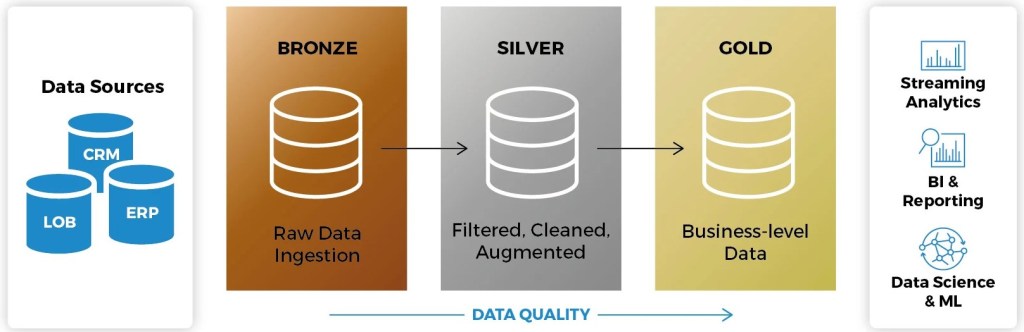
Before diving into the workspace debate, let’s quickly revisit what medallion architecture is all about. In Microsoft Fabric, this approach is used to organize data processing and storage in a structured way, typically across three layers:
- Bronze Layer: This is the staging area where raw data lands, often in its original, unaltered state.
- Silver Layer: In this layer, data undergoes transformation—cleansing, deduplication, and standardization—to prepare it for analytical use.
- Gold Layer: The final layer is where data is further refined and aggregated, ready for consumption by analytics tools like Power BI or for regulatory assessments through Microsoft Purview.
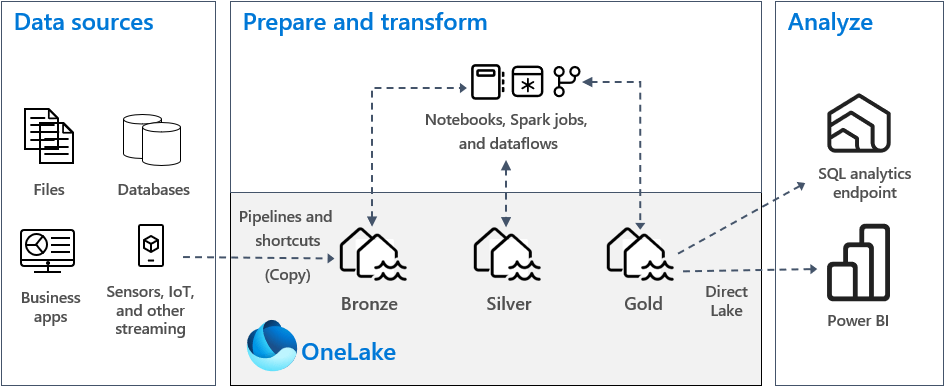
Each layer serves a specific purpose, and while these three layers are generally recommended, the architecture can be tailored to suit the unique requirements of your business.
The Workspace Dilemma: Single vs. Multiple Workspaces
The central debate revolves around whether to consolidate all three layers into a single workspace or to distribute them across multiple workspaces. Here’s a breakdown of the key considerations that should guide your decision.
1. The Operating Environment
The first factor to consider is the environment in which your medallion architecture will operate. If you’re working in a controlled environment with minimal external dependencies, a single workspace might be sufficient. However, if your architecture needs to be deployed across different environments—perhaps with varying levels of security or compliance requirements—testing in separate workspaces is essential to ensure seamless functionality.
2. Data Sensitivity and Security
Data sensitivity is another critical factor. For environments dealing with highly sensitive data, using multiple workspaces can enhance security by isolating different layers of data. For instance, raw data in the bronze layer may be restricted to data engineers, while refined data in the gold layer might be accessible to business analysts. This segregation helps ensure that only authorized personnel have access to the appropriate data, thereby reducing the risk of data breaches.
3. Governance and Compliance
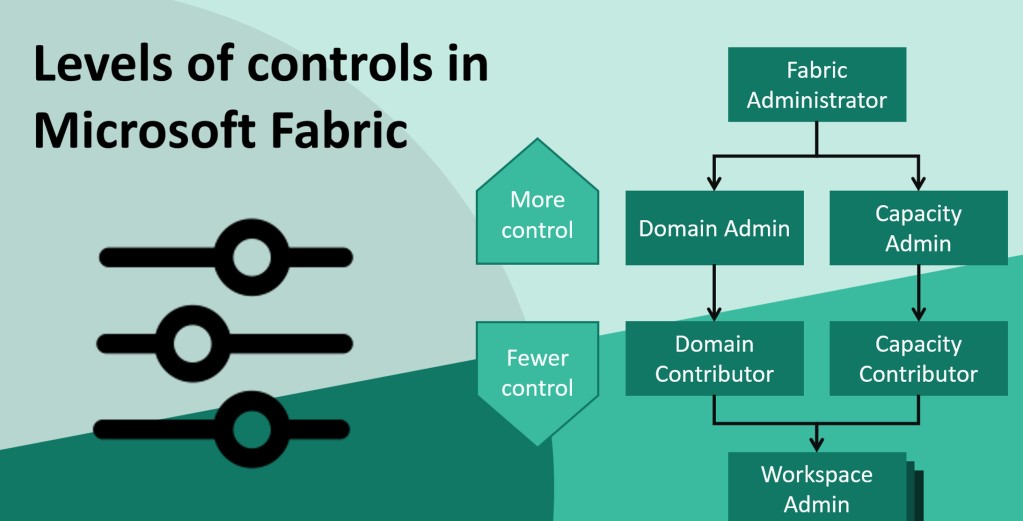
Governance requirements often dictate the need for multiple workspaces. In organizations with strict compliance mandates, maintaining separate workspaces for each layer can help enforce access controls and data governance policies more effectively. For example, if different teams are responsible for different stages of data processing, separate workspaces allow for better management of permissions and auditing.
4. Performance and Capacity Management
Performance considerations can also influence your decision. If your organization handles large volumes of data, distributing workloads across multiple workspaces can prevent bottlenecks and ensure that each layer operates efficiently. This is particularly important if your data processing involves intensive operations that could strain resources if consolidated into a single workspace.
Additionally, capacity planning is crucial. For instance, higher-tier Fabric capacities might be required for certain layers, especially if you’re leveraging advanced features like Copilot for Data Factory or dealing with stringent data sovereignty requirements. Deciding whether all layers need the same level of resources—or if they should be split across different workspaces—can help optimize both performance and cost.
5. Flexibility and Scalability
The architecture’s flexibility and scalability are also important considerations. By using multiple workspaces, you can scale each layer independently, adapting to changing business needs without disrupting the entire data pipeline. This approach is particularly beneficial in dynamic environments where data volumes and processing requirements fluctuate frequently.
6. Complexity of Administration
While multiple workspaces offer several benefits, they also introduce complexity in terms of administration. Managing several workspaces, especially in environments that require separate workspaces for Development, Testing, Acceptance, and Production can be challenging. The more workspaces you have, the more complex it becomes to maintain consistency, enforce policies, and troubleshoot issues across your Microsoft Fabric environment.
Final Thoughts
There’s no one-size-fits-all answer to how many workspaces you should use for medallion architecture in Microsoft Fabric. The decision ultimately depends on your organization’s specific needs, including data sensitivity, governance requirements, performance goals, and administrative capabilities. By carefully considering these factors, you can design a workspace strategy that aligns with your operational objectives and supports the efficient, secure management of your data.
 Rikin Basu
Leave a comment